Repair tickets
Repair tickets that follow the job from check-in to pickup
A repair ticket in Repairs helper holds the customer, the device, what is wrong, the work done, the parts ordered and the money taken. Staff open it from the counter, the bench or a phone, and everyone sees the same status.
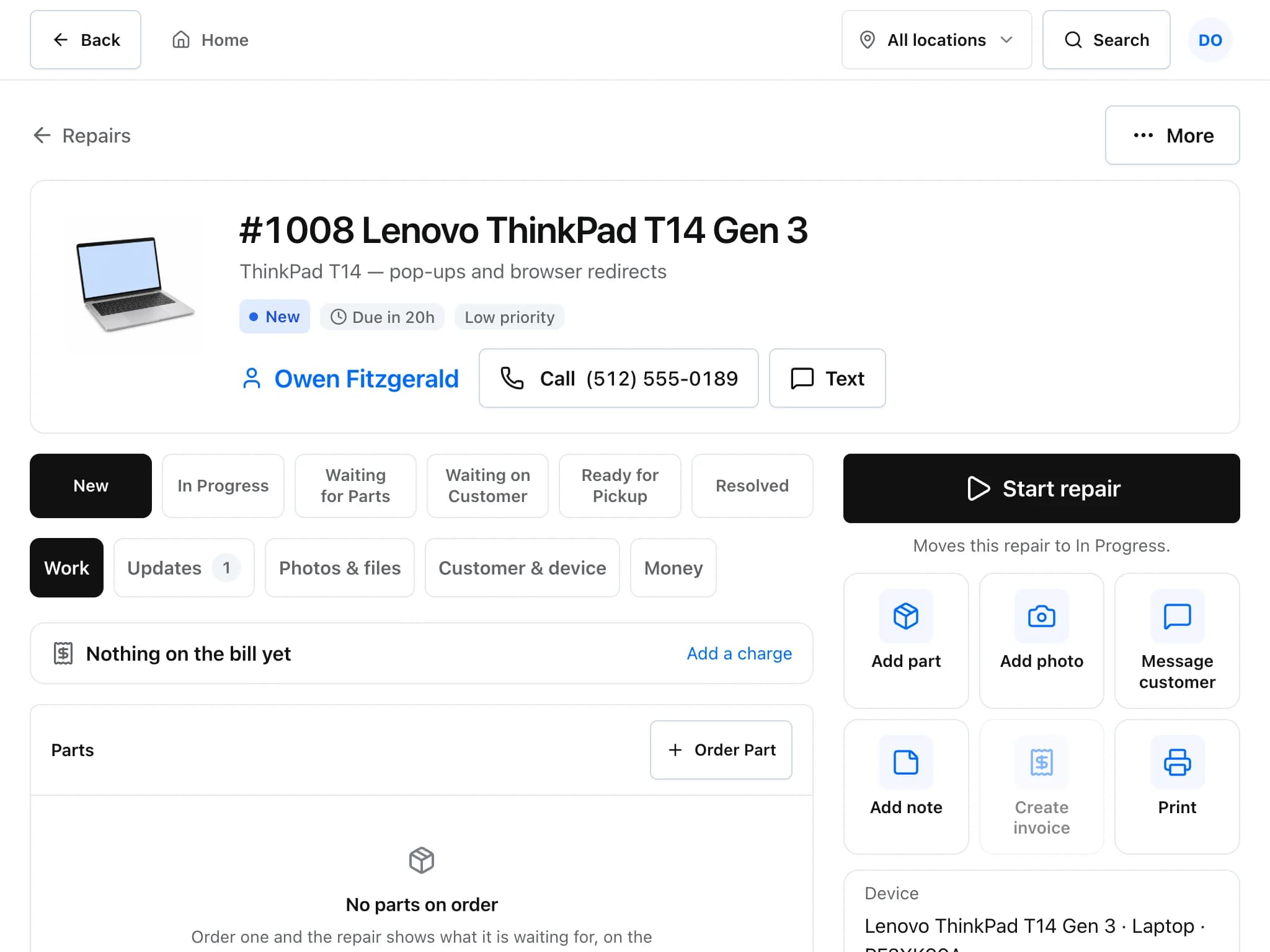
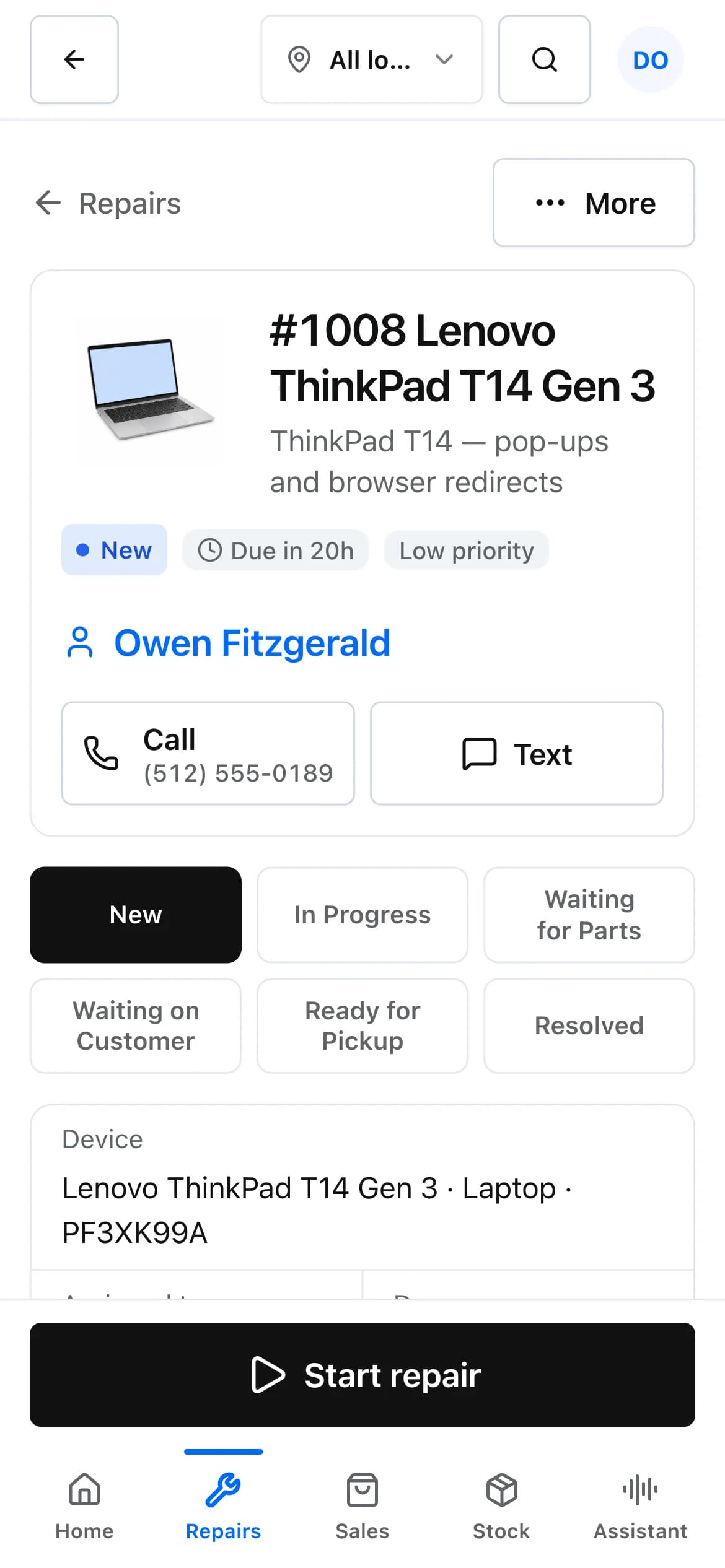
How a repair moves through the shop
The New repair check-in is four short steps, built for a tablet on the counter. Email, passcode and IMEI are optional, so a busy desk can check a device in without typing everything.
Find or add the customer
Search by name or phone, or add a new customer on the spot. Their past devices and repairs come with them.
Pick the device and the problem
Picture boxes for phone, tablet, laptop, computer, game console, TV, watch and other. The shop can rename, hide or add boxes and problem types in settings.
Record the details and sign
Make, model, serial and unlock code are saved on the customer's device record. The customer can sign the intake on screen, and a deposit can be taken right there.
Work it, then hand it over
Start repair moves the ticket to In Progress. Add parts, photos and notes, mark it Ready for Pickup, invoice it, and hand it over once it is paid.
What a ticket keeps track of
- Status steps you can edit
- Built-in steps are New, In Progress, Waiting for Parts, Waiting on Customer, Ready for Pickup and Resolved. Owners can add their own steps in the Workflow settings.
- Due times by priority
- Each priority has a response target. Defaults are 4 hours for urgent, 24 for high, 72 for normal and 120 for low, and you can change them. Late repairs are flagged on the ticket and counted on Home.
- Checklists
- Save checklist templates (for example a pre-repair inspection or a quality check) and attach one to a ticket. Each item records when it was ticked.
- Parts on order
- Order a part from inside the ticket with supplier, cost and expected date. The ticket shows what it is waiting for, and a part order can be linked to a purchase order.
- Time on the job
- Technicians log time against a ticket. Billable time turns into labour lines on the invoice at your labour rate.
- Notes, photos and updates
- Private notes stay with staff. Public updates are visible to the customer in their portal and, with a sender set up, go out by email or text.
- Warranty repairs
- Mark a repair as warranty work and link it to the invoice line it is covering. Warranty days set on a product are copied onto each sale, so you can check whether cover is still active.
- A board for the workshop
- The shop-floor board shows every open repair as a large tile, grouped by status, and refreshes itself every 30 seconds. Leave it running on a wall TV.
Repair tickets: common questions
Can I change the repair statuses?
Yes. Owners can edit the list of ticket statuses in Settings under Workflow. Resolved stays as the final step so reports and the customer portal know when a repair is finished.
Does it track which repairs are late?
Yes. Every priority has a target in hours (by default 4 for urgent, 24 for high, 72 for normal and 120 for low). A ticket past its due time is marked late, and owners can be alerted once when that happens.
Where is the device passcode stored?
On the customer's device record, next to make, model and serial number. It is optional, and the check-in does not require it.
Can customers sign at check-in?
Yes. The intake has an optional on-screen signature, and the signature is printed on the ticket sheet.
Can two technicians share one counter tablet?
Yes. Each person can set a six-digit staff PIN and switch from the account menu, so work is recorded under the right name without a full sign-in each time.
Related features
- Estimates and invoicesQuote a repair, get the customer's approval and signature online, then invoice and collect payment.
- InventoryKeep parts and accessories counted, track serial numbers, and order from vendors with purchase orders.
- Customer portal and check-inLet customers check in, follow their repair, approve estimates and pay without calling the shop.
Try it on your own counter
Create a shop, add a test repair and see whether it fits how you work. It is free during early access.
Free during early access · No credit card